 Black friday 75% Off:
Quick Answer: How to Set Up Christmas Village Lights
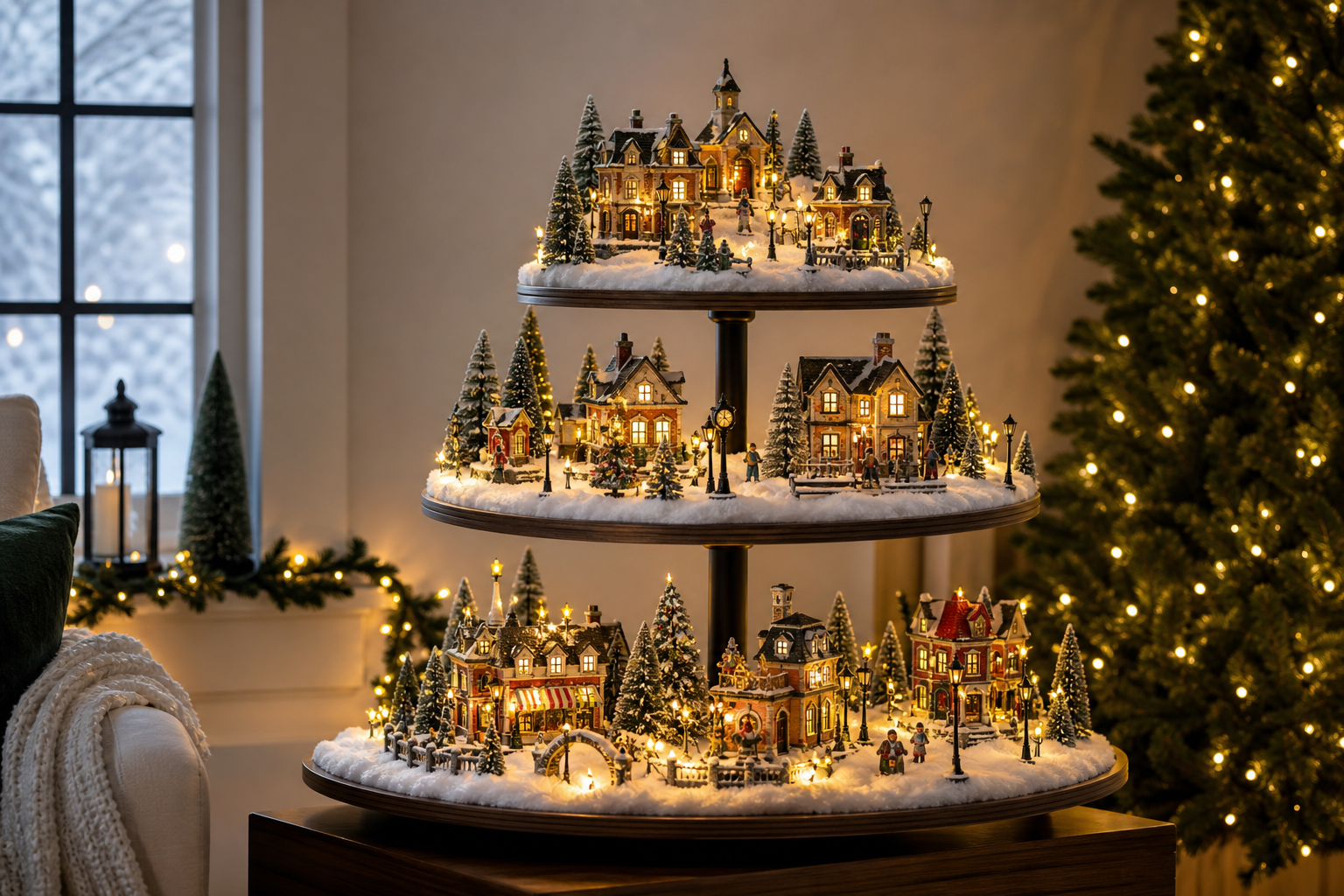
Plan your layout, pick miniature-safe lighting (often LED) that suits your buildings and scenery, and place lights under “snow,” behind houses, along paths, and in trees. Test and balance brightness before securing wires. If you’re using the Momentree Christmas Village Display Tree – Pre-Lit, assemble the stand as directed and use its built-in decorative lighting modes to set the ambiance.
Key Takeaways
- Choose lights sized for miniatures; LEDs typically run cooler and are a good fit for close-up scenes. Always follow each product’s label and instructions.
- Create depth by lighting from multiple angles: inside windows, under snow blankets, behind buildings, and along pathways—then test from eye level.
- Power safely: avoid overloaded outlets, follow strand-connection limits for your specific lights, and turn everything off when unattended.
- With the Momentree Christmas Village Display Tree – Pre-Lit, you get decorative string lighting plus eight selectable modes—use them as your display’s anchor and add accents around it.
- Hide wires with snow, ground cover, and tidy routing; centralize power with compatible hubs or adapters designed for your accessories.
What You’ll Need: Supplies & Planning
Thoughtful planning helps your christmas village lights look magical and stay tidy.
Lighting types you can consider
- LED micro/fairy strings and miniature LEDs: Flexible, small-diameter wiring makes them easy to thread along rooftops, trees, or paths. LEDs also typically operate cooler than incandescent holiday lights.
- Legacy cord-and-bulb systems for buildings: Many older village pieces use replacement cords and 120V bulbs designed for their sockets.
- USB-powered LED cords and dimmable village lights: Convenient power and brightness control for select accessories.
- Low-voltage DC adapters for accessories: Many animated or lighted accessories use brand-specific 4.5V adapters; use the adapter type and capacity recommended by the accessory maker.
- Modular miniature-lighting hubs: Model-scenery systems offer plug-in LED ports, optional dimming/sequence modules, and neat cable management.
Helpful accessories
- Indoor-rated extension cords, surge protectors, and timers/smart plugs.
- Adhesive cable clips or tie mounts, small cable ties, and labels for neat routing.
- Snow blankets, ground cover, and risers to conceal cords and shape your terrain.
Scale and compatibility
- Match the light type to your pieces. Buildings with bulb sockets may need specific cords/bulbs; streetlamps or posts may use low-voltage adapters; tiny scene details benefit from micro LEDs.
- Connectors and adapters vary by brand. Use accessories and power supplies recommended by each building/accessory’s manufacturer.
Where Momentree fits
- The Momentree Christmas Village Display Tree – Pre-Lit is a productized village configuration built on the Holiday Display Tree modular platform, specifically set up for Christmas-village scenes. It includes decorative string lighting and tiers that arrive pre-decorated with Christmas garland (green branches with red berries and pinecones). Assemble the stand, place your village on the tiers, then select a lighting mode to set the mood.
Step-by-Step: Arranging and Installing Your Christmas Village Lights
1) Map your layout
- Sketch or dry-run your village on the tabletop or tiered stand. Mark focal buildings and where you want gentle glow versus sparkle.
2) Prep safe power
- Choose indoor-rated cords and listed products. Inspect for cracked sockets or frayed wires. Test each light set before integrating it into the scene.
3) Place buildings and conceal primary runs
- Position your houses, roads, and trees first. Run the main power lines where they’ll be hidden—behind buildings, along the back edge, or beneath snow or risers. Avoid pinching cords under rugs, doors, or heavy props, and keep them away from heat sources.
4) Add accent lighting
- Thread micro LEDs through trees. Tuck lights behind buildings to give a window glow. Run a subtle string under snow blankets to create an even ground light. Consider tiny spots for signs or a town square.
5) Balance brightness and color
- Dim or reposition as needed using your accessory system’s controls (if available) or by moving lights further from windows and reflective surfaces. Aim for varied intensities so one area doesn’t overpower the rest.
6) Secure and label
- Use adhesive tie mounts, cable ties, or painter’s tape to keep paths tidy. Leave service loops and label runs so you can trace a problem quickly later.
7) Power up carefully
- Follow the limits printed on your light sets. Many authorities advise not connecting more than three standard incandescent strings together; LED limits differ—always follow the specific product’s label. Use timers/smart plugs to shut off when you’re away or asleep.
8) If you’re using Momentree’s Pre-Lit display
- Assemble the stand by building upward from the base, connecting the center support and adding tiers progressively, then place your buildings and figurines. Turn on the decorative string lighting and choose from the eight available modes: Combination, In wave, Sequential, Slo glo, Chasing/flash, Slow fade, Twinkle/flash, or Steady on. If the lights don’t illuminate, confirm the power connection and cycle through the modes.
Choosing Lighting Modes and Special Effects (with Momentree Capabilities)
Special effects can bring your village to life:
- Fading and slow transitions create a gentle, nightfall feel.
- Flashing or chasing effects evoke a carnival, skating rink, or festive street.
- Twinkle offers a wintry “snowfall” vibe, while steady lighting feels timeless and classic.
On the Momentree Christmas Village Display Tree – Pre-Lit, you can select among eight modes to suit your scene:
- Combination: Rotates through all effects for a lively display.
- In wave and Sequential: Movement effects that feel like flowing or stepping lights.
- Slo glo and Slow fade: Softer transitions for a cozy ambiance.
- Chasing/flash and Twinkle/flash: Higher-energy sparkle; use sparingly to avoid overwhelming small scenes.
- Steady on: A calm, classic glow—great as a base when you add separate accent lights elsewhere in the village.
Blending effects
- Keep your accent lights complementary. For example, use Steady on as the main tree glow, then add subtle micro LEDs in shop windows. Aim for similar color temperature across different light types to maintain a cohesive look.
Safety and Troubleshooting
Safety first
- Use only indoor-rated, listed light sets and cords from recognized testing labs. Inspect for damage before use.
- Avoid overloading outlets or power strips. Do not run cords under rugs or where they can be pinched or damaged, and keep them away from heat or water.
- Follow product-specific limits. Many safety authorities advise no more than three standard incandescent strands connected together. LED limits vary—always follow the label on your exact product.
- Turn off all decorations when leaving home or before bed; timers and smart plugs help automate this.
Troubleshooting basics
- Check power in stages: outlet → extension/timer → light string/adaptor → individual accessory.
- Replace fuses in plugs where provided, and swap any burned-out bulbs with the correct type.
- For low-voltage accessories, use the recommended adapter and ensure the total current draw stays within the adapter’s rating.
- If a particular area is dark, reseat connectors and verify that any in-line switches are on. For pre-lit displays like the Momentree tree, confirm the power connection and cycle through the built-in modes.
Expert Tips for a Magical Christmas Village Glow
- Layer by height for realism: Use risers or a tiered stand to place brighter focal points mid-level, with subtler background lighting behind. On the Momentree display, arrange buildings across the tiers to create natural foreground/middle/background depth.
- Disguise the mechanics: Hide wires in snow blankets, faux moss, or behind structures. Route cables along the back, anchor with discreet clips, and label leads for quick fixes later.
- Guide the eye with contrast: Not every building needs the same brightness. Keep one or two highlights (a town square or carousel), then let surrounding streets glow softly to draw viewers through the scene.
- Change the mood over time: Rotate the Momentree lighting modes across the season—try Steady on for quiet evenings, Twinkle/flash when guests arrive, or Slow fade for cozy nights.
FAQ
Q: What type of lights are best for Christmas village displays?
A: LEDs are a great fit for miniatures because they typically run cooler than incandescent sets. For buildings or accessories, match the light or adapter type recommended by the manufacturer (e.g., legacy cords/bulbs, USB LEDs, or low-voltage adapters) and follow all labels.
Q: How do you hide wires in a miniature village setup?
A: Use snow blankets, ground cover, risers, and the backs of buildings to conceal runs. Route cables along edges, secure with small adhesive clips, and label them. Centralized hubs or adapter systems can shorten visible cable paths.
Q: Can you use LED or incandescent lights for village houses?
A: Yes. Both can work if they match your building’s socket or adapter. LEDs typically use less energy and run cooler. If you use incandescent strings, follow the product’s connection limits and give them space away from heat-sensitive décor.
Q: How do you troubleshoot christmas village lights that won’t turn on?
A: Test from the wall outward: verify the outlet and any timer, then check fuses, bulbs, and connections on the string or adapter. Power accessories individually to isolate faults. For pre-lit displays, confirm the power connection and cycle through modes.
Q: Are pre-lit Christmas village display trees safe for indoor use?
A: Choose products labeled for indoor use and listed by a recognized testing lab, then follow the manufacturer’s instructions. Keep lights away from heat sources and turn them off when unattended. Always observe the safety guidance supplied with your specific product.
Q: How do Momentree’s lighting modes work?
A: The Christmas Village Display Tree – Pre-Lit includes decorative string lighting with eight selectable modes: Combination, In wave, Sequential, Slo glo, Chasing/flash, Slow fade, Twinkle/flash, and Steady on. Choose the mode that matches your scene’s mood.
Q: How do you prevent overheating of christmas village lights?
A: Follow all product labels. Give lights ventilation (don’t bury them tightly), keep them away from heat sources, observe connection limits for incandescent strands, and turn everything off when you’re asleep or away.
Q: What are some creative ways to position lights in a village display?
A: Backlight buildings to make windows glow, run a soft string under snow for ground light, add tiny spots to signs or trees, and vary brightness so one area leads the eye to the next.
Related Guides
- Explore more Christmas village display ideas
- Tips for displaying your Christmas village on a multi-level stand
- More about the Momentree Pre-Lit Christmas Village Display Tree
Sources
- Electrical Safety Foundation International (ESFI): Indoor holiday lighting safety tips — listed products, inspections, strand limits, and turning lights off when unattended. https://www.esfi.org/indoor-lights-and-electrical-decorations-safety-tips/
- U.S. Consumer Product Safety Commission: Holiday decoration safety reminders, including strand-connection guidance for standard incandescent strings. https://www.cpsc.gov/s3fs-public/611.pdf
- National Fire Protection Association (NFPA): Winter holiday safety tip sheet — indoor/outdoor labeling awareness and turning off lights before bed. https://content.nfpa.org/-/media/project/storefront/catalog/files/safety-tip-sheets/winterholidaysafetytips.pdf
- Department 56: Replacement cords and 120V bulbs for village buildings. https://www.department56.com/collections/replacement-parts/cord and https://www.department56.com/products/120-volt-village-replacement-bulbs
- Department 56: Village Lights Collection (USB LED options). https://www.department56.com/collections/village-lights
- Lemax Help Center: Power adapter FAQs for low-voltage accessories. https://support.lemaxcollection.com/support/solutions/articles/36000198602-power-adapter-faq-s
- Woodland Scenics: Just Plug Lighting System overview (modular hubs, tidy routing). https://woodlandscenics.woodlandscenics.com/show/category/JPLSBuildings
- Department 56: Start Collecting (hubs/cord management tips). https://www.department56.com/pages/start-collecting


